TOON Format Documentation
Complete JSON to TOON Conversion Guide - TOON Syntax & Serialization Format
Introduction
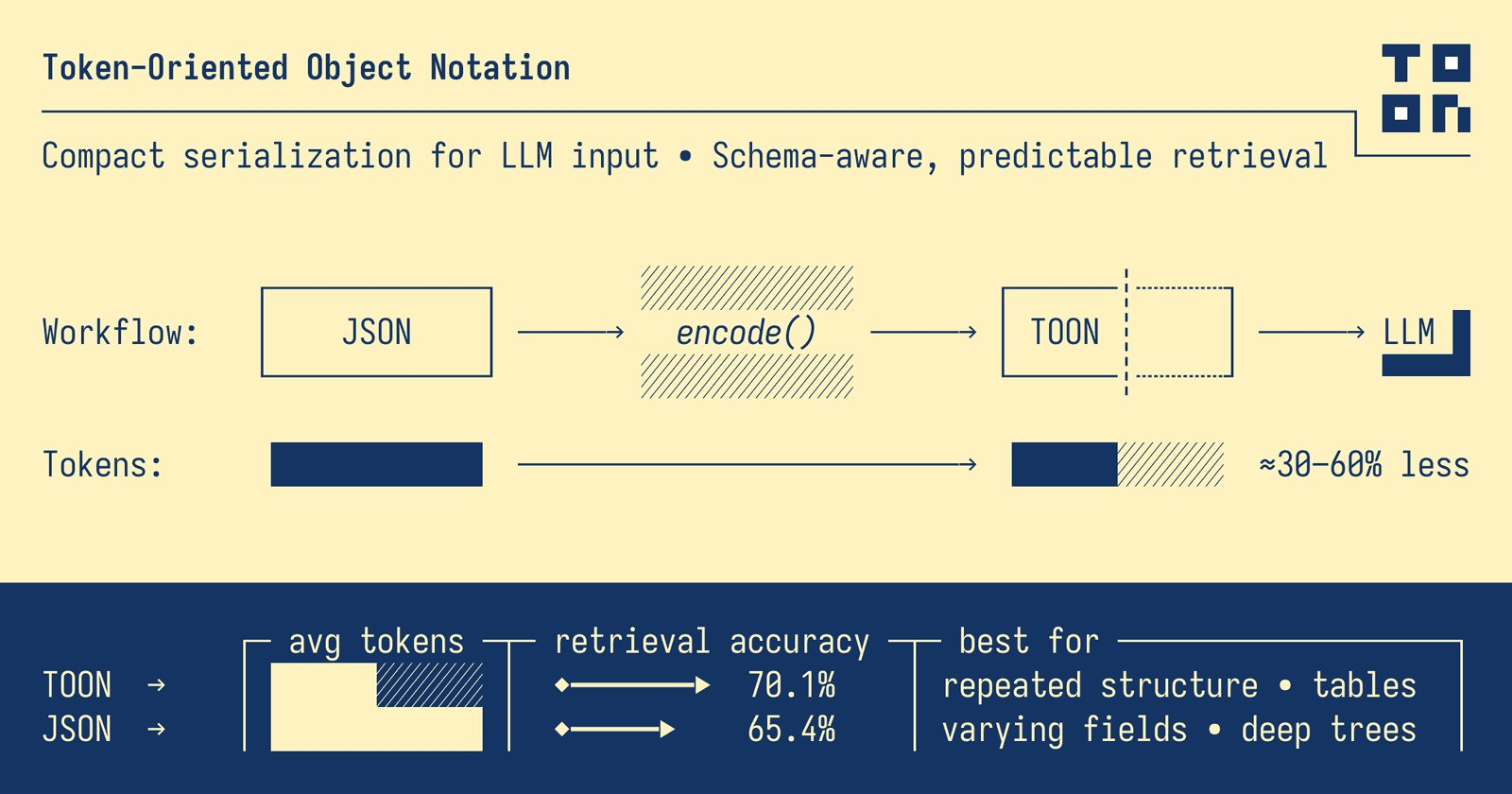
Token-Oriented Object Notation (TOON) is a compact, human-readable serialization format designed for passing structured data to Large Language Models with significantly reduced token usage. It's intended for LLM input as a lossless, drop-in representation of JSON data.
TOON's sweet spot is uniform arrays of objects – multiple fields per row, same structure across items. It borrows YAML's indentation-based structure for nested objects and CSV's tabular format for uniform data rows, then optimizes both for token efficiency in LLM contexts.
Why TOON?
AI is becoming cheaper and more accessible, but larger context windows allow for larger data inputs as well. LLM tokens still cost money – and standard JSON is verbose and token-expensive.
Before (JSON - 125 tokens)
{
  "users": [
    { "id": 1, "name": "Alice", "role": "admin" },
    { "id": 2, "name": "Bob", "role": "user" }
  ]
}
After (TOON - 54 tokens)
users[2]{id,name,role}:
  1,Alice,admin
  2,Bob,user
Result: 57% fewer tokens for the same data!
Key Features
- 💸 Token-efficient: typically 30–60% fewer tokens than JSON
- 🤿 LLM-friendly guardrails: explicit lengths and fields enable validation
- 🍱 Minimal syntax: removes redundant punctuation (braces, brackets, most quotes)
- 📐 Indentation-based structure: like YAML, uses whitespace instead of braces
- 🧺 Tabular arrays: declare keys once, stream data as rows
Benchmarks
Token counts are measured using the GPT-5 o200k_base tokenizer. Actual savings vary by model and tokenizer.
Savings: 42.3% (6,400 tokens)
Savings: 58.9% (6,470 tokens)
Savings: 35.4% (91 tokens)
Installation & Quick Start
Using npm
npm install @toon-format/toonUsing pnpm
pnpm add @toon-format/toonUsing yarn
yarn add @toon-format/toonExample Usage
import { encode } from '@toon-format/toon'

const data = {
  users: [
    { id: 1, name: 'Alice', role: 'admin' },
    { id: 2, name: 'Bob', role: 'user' }
  ]
}

console.log(encode(data))
// Output:
// users[2]{id,name,role}:
//   1,Alice,admin
//   2,Bob,user
Format Overview
Objects
Simple objects with primitive values:
// Input
{ id: 123, name: 'Ada', active: true }

// Output
id: 123
name: Ada
active: true
Nested objects:
// Input
{ user: { id: 123, name: 'Ada' } }

// Output
user:
  id: 123
  name: Ada
Arrays
Primitive Arrays (Inline)
// Input
{ tags: ['admin', 'ops', 'dev'] }

// Output
tags[3]: admin,ops,dev
Arrays of Objects (Tabular)
When all objects share the same primitive fields, TOON uses an efficient tabular format:
// Input
{ items: [
  { sku: 'A1', qty: 2, price: 9.99 },
  { sku: 'B2', qty: 1, price: 14.5 }
]}

// Output
items[2]{sku,qty,price}:
  A1,2,9.99
  B2,1,14.5
Mixed and Non-Uniform Arrays
Arrays that don't meet tabular requirements use list format:
// Input
{ items: [1, { a: 1 }, 'text'] }

// Output
items[3]:
  - 1
  - a: 1
  - text
Quoting Rules
TOON quotes strings only when necessary to maximize token efficiency.
Strings That Require Quotes
| Condition | Examples |
|---|---|
| Empty string | "" |
| Leading/trailing spaces | " padded ", " " |
| Contains delimiter, colon, quotes | "a,b", "a:b", "say \"hi\"" |
| Looks like boolean/number/null | "true", "42", "null" |
| Starts with list syntax | "- item" |
| Looks like structural token | "[5]", "{key}" |
Strings That Don't Need Quotes
- Unicode and emoji:
hello 👋 world - Strings with inner spaces:
hello world - Alphanumeric with punctuation:
user_name,user.name
API Reference
encode(value, options?)
Converts any JSON-serializable value to TOON format.
Parameters
value(any) – JSON-serializable valueoptions(optional) – Encoding options:indent(number) – Spaces per indentation level (default: 2)delimiter(string) – Array delimiter:',','\t','|'(default:',')lengthMarker(boolean) – Add#prefix to array lengths (default: false)
Example
import { encode } from '@toon-format/toon'

// Basic encoding
const data = { users: [{ id: 1, name: 'Alice' }] }
console.log(encode(data))

// With options
console.log(encode(data, {
  delimiter: '\t',
  lengthMarker: '#'
}))
decode(input, options?)
Converts a TOON-formatted string back to JavaScript values.
Parameters
input(string) – TOON-formatted stringoptions(optional) – Decoding options:indent(number) – Expected indentation (default: 2)strict(boolean) – Enable strict validation (default: true)
Example
import { decode } from '@toon-format/toon'

const toon = `users[2]{id,name}:
  1,Alice
  2,Bob`

const data = decode(toon)
// { users: [{ id: 1, name: 'Alice' }, { id: 2, name: 'Bob' }] }
Command Line Interface
TOON includes a CLI tool for converting between JSON and TOON formats.
Basic Usage
npx @toon-format/cli [options] [input]Examples
# Encode JSON to TOON
npx @toon-format/cli input.json -o output.toon

# Decode TOON to JSON
npx @toon-format/cli data.toon -o output.json

# Pipe from stdin
cat data.json | npx @toon-format/cli

# Show token savings
npx @toon-format/cli data.json --stats

# Use tab delimiter
npx @toon-format/cli data.json --delimiter "\t"
Options
| Option | Description |
|---|---|
-o, --output |
Output file path (stdout if omitted) |
-e, --encode |
Force encode mode |
-d, --decode |
Force decode mode |
--delimiter |
Array delimiter: comma, tab, pipe |
--indent |
Indentation size (default: 2) |
--length-marker |
Add # prefix to array lengths |
--stats |
Show token count and savings |
--no-strict |
Disable strict validation |
Using TOON in LLM Prompts
TOON works best when you show the format instead of describing it. The structure is self-documenting – models parse it naturally once they see the pattern.
Sending TOON to LLMs (Input)
Wrap your encoded data in a fenced code block and label it as toon:
```toon
users[3]{id,name,role}:
  1,Alice,admin
  2,Bob,user
  3,Charlie,user
```

Question: How many users have the role "user"?
Generating TOON from LLMs (Output)
When you want the model to generate TOON, be explicit about the rules:
Task: Return only users with role "user" as TOON.

Rules:
- 2-space indent
- No trailing spaces
- [N] must match row count
- Use header format: users[N]{id,name,role}:

Output only the TOON code block.encode(data, { delimiter: '\t' }). Tabs often tokenize better than commas.Notes and Limitations
When TOON Excels
- Uniform arrays of objects (same fields, primitive values)
- Large datasets with consistent structure
- Tabular data with 10+ rows
- Time-series analytics data
- API responses with repeated structures
When JSON is Better
- Non-uniform data with varying field sets
- Deeply nested structures (3+ levels)
- Small datasets (<10 items)
- Objects with mixed or nested array values
Important Considerations
- Token counts vary by tokenizer and model
- Benchmarks use GPT-style tokenizers (cl100k/o200k)
- TOON is designed for LLM input, not APIs or storage
- Real-world performance depends on your data structure
Syntax Cheatsheet
| Input (JSON) | Output (TOON) |
|---|---|
{ id: 1, name: 'Ada' } |
|
{ user: { id: 1 } } |
|
{ tags: ['foo', 'bar'] } |
tags[2]: foo,bar |
{ items: [{ id: 1, qty: 5 }, { id: 2, qty: 3 }] } |
|
{ items: [1, { a: 1 }, 'x'] } |
|
['x', 'y'] |
[2]: x,y |
{} |
(empty output) |
{ items: [] } |
items[0]: |
Full Specification
For precise formatting rules, edge cases, and implementation details, see the official TOON specification:
📋 TOON Format Specification v1.3
The specification includes:
- Detailed syntax rules
- Edge case handling
- Conformance tests
- Implementation guidelines
- Format versioning
Other Implementations
Official Implementations
- JavaScript: @toon-format/toon
- Python: toon_format (in development)
- Rust: toon_format (in development)
Community Implementations
- .NET: ToonSharp
- C++: ctoon
- Crystal: toon-crystal
- Dart: toon
- Elixir: toon_ex
- Gleam: toon_codec
- Go: gotoon
- Java: JToon
- PHP: toon-php
- Ruby: toon-ruby
- Swift: TOONEncoder
Get Started with TOON
Ready to start optimizing your LLM costs with TOON? Here are some resources to help you get started:
Online Converter
Try our free JSON to TOON converter tool in your browser.
What is TOON?
Learn the fundamentals and key features of TOON format.
Conversion Tutorial
Step-by-step guide to converting JSON to TOON.
TOON vs JSON
Detailed comparison with benchmarks and examples.
More Articles
Browse all TOON tutorials, tips, and best practices.
Need Help?
Contact us with your questions or feedback.